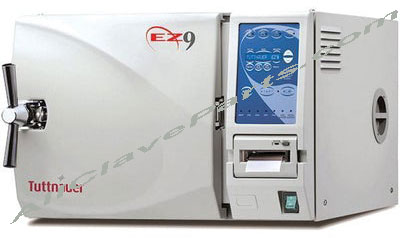
Autoclave Repairs Are Expensive – Do This Instead

If you’ve ever had to send your autoclave out for repairs then you know how expensive it can be.

You’ll have shipping costs both ways, you’ll have to rent a spare while yours is at the shop, then you’ll have to pay for the parts and labor.  Sometimes it’s cheaper just to chuck it out the back door and buy a new one.  The next time you have problems with your autoclave, don’t call the manufacturer.  Do this instead!

Read the manual:

You’d be surprised how many people open the box, set up the autoclave, and throw everything else away.  Each
manufacturer has different guidelines for using their equipment properly.

There’s usually a user’s manual in that box and it’s packed with important information.

There may not be anything wrong with your autoclave at all.  It might just be that you’re not using it right.

For example, if your spore test results came back negative, it may be that you’re not using enough time or heat for the type of metal
you’re trying to sterilize.

Or it could be something as simple as cleaning a filter to improve the pressure.  But you’ll never know if you don’t read the manual.

Do some research:  If the answer isn’t in the user’s manual, don’t give up.  Do some research on the problem.  This blog is packed with information on all
makes and models of autoclaves and we have troubleshooting advice on almost any problem you can imagine.

It’s also helpful to learn how your particular autoclave works so you can learn where different problems might originate.  Once you can identify the source of the problem, you’ll usually be surprised at how easy it is to fix.

And that’s not as complicated as it sounds.  You know what causes different problems when you’re talking about your car.

An autoclave is a lot less complicated than an automobile!

Fix it yourself:

That’s right – you can do a lot of your own autoclave repairs.  The hardest part about repairing these machines is identifying the part you need.
And you’ll usually be able to find that information right here on this blog.

So, the next time you’re thinking about sending that autoclave out for repair, fix it yourself instead.


Share and Enjoy:
  • Digg
  • del.icio.us
  • Facebook
  • NewsVine
  • Reddit
  • StumbleUpon
  • Google Bookmarks
  • Yahoo! Buzz
  • Twitter
  • Technorati
  • Live
  • LinkedIn
  • MySpace

Autoclave Repair Made Simple

When your autoclave breaks down, you have 3 choices to get it back up and running again:

1.You Can Pick Up The Phone & Call A Local Autoclave Repair Technician (if you have one)
2.You Can Box It Up & Send It Off For Repair
3.You Can Do The Autoclave Repair Yourself

Maybe the third option (doing the autoclave repair yourself) is something you have never considered…. for a variety of reasons,

It might be because you think it is too complicated, or you don’t know where to begin

Maybe you are afraid if you run into a problem, you have no where to turn for technical support, and if you do find support, they will charge you more than it would have cost for you to send it off for someone else to repair in the first place.

Or maybe you are afraid you will just screw it up and cause more damage than you started with

But with minimum charges for autoclave repair now approaching $2000.00 or more, repairing it yourself is quickly becoming the most viable option…and something you, or a member of your staff can do

First, let me dispel the autoclave repair myths, that it is complicated, sophisticated, and requires special tools and training.

In fact, most autoclave repairs consist mostly of simply replacing parts……..that is finding the defective part, and replacing it with a new one. And if you have a screwdriver and a couple of ordinary wrenches, then you probably already own the tools necessary to complete most autoclave repairs you will run into

With that being said, if you can turn a wrench & know how to use the screwdriver, you have the necessary skill set to complete most autoclave repairs

Autoclave repair really is just that simple. The “trick” is in knowing how to find the part(s) causing the problem(s) you are encountering. Also known as “Autoclave Troubleshooting”

Most Autoclave Troubleshooting is accomplished by determining the symptoms and simply following the path.

What?

Let me explain. Let’s say you are having a problem with water not filling the chamber like it is supposed to. No water in the autoclave chamber (or filling slowly) is the symptom. And now for the path…….

First, lets look at where the water starts ,and where it is supposed to end up. The water starts in the water reservoir and ends up in the autoclave chamber. The path the water takes to get there is through the tubing, with various parts and filters along the way. To troubleshoot the filling problem with the autoclave, you merely follow the path the water takes and find out where it is stopping

Once you know where it stops, you know which part to replace (or clean out)!

You can follow this same autoclave troubleshooting process for pretty much any problem you encounter with your autoclave

And, if you should run into a problem, or just need someone to walk you through things, there is now free autoclave repair technical support available.

Share and Enjoy:
  • Digg
  • del.icio.us
  • Facebook
  • NewsVine
  • Reddit
  • StumbleUpon
  • Google Bookmarks
  • Yahoo! Buzz
  • Twitter
  • Technorati
  • Live
  • LinkedIn
  • MySpace

Tuttnauer EZ10 High Temp Error

Error Message “HIGH TEMP

When your Tuttnauer EZ10 Autoclave aborts the cycle, the Cycle Fail light comes on, and the display reads HIGH TEMP…..Here is what you need to know

To help you locate the problem, the first thing you need to do is to determine when this is happening. Is it failing during the Sterilization Phase Cycle or just before the Heat Phase starts? If the “HIGH TEMP” error is occurring…….

During The Sterilization Cycle

The cycle is aborted and the Cycle Fail indicator lights up and the Display reads “HIGH TEMP” on your Tuttnauer EZ10 autoclave during the Sterilization Phase of the Cycle if the temperature rises 9°F (5°C) above the required sterilization temperature during the Sterilization phase of the cycle.

Possible causes for this message on the Tuttnauer EZ10 Autoclave are: The Heating Elements are remaining on instead of cycling on and off

Check Your Tuttnauer EZ10 Autoclave For

  • A Shorted Solid State Relay (if found defective, replacement is required)
  • Shorted Heating Element (if found defective, replacement will be required)
  • Other Short Circuit (check all wiring on your Tuttnauer EZ10 Autoclave for loose connections or breaks….tighten loose connections and replace any damaged wire)

If the “HIGH TEMP” is being displayed……

Before Or During The Heat Phase

If the error is occurring before the Heat UP Phase Starts or any time during the Heat Up Phase, it indicates a defective Temperature Sensor and the Temperature Sensor on your Tuttnauer EZ10 Autoclave will need to be replaced

“Tuttnauer EZ10 Autoclave Repair Made Simple™”
Share and Enjoy:
  • Digg
  • del.icio.us
  • Facebook
  • NewsVine
  • Reddit
  • StumbleUpon
  • Google Bookmarks
  • Yahoo! Buzz
  • Twitter
  • Technorati
  • Live
  • LinkedIn
  • MySpace

Why Your Tuttnauer Autoclave Is Failing Spore Tests

If your Tuttnauer Autoclave is failing spore tests, or the indicator strip on the Sterilization Pouch is not changing colors,
the cause & remedy is usually a pretty simple one

The leading cause for the Tuttnauer Autoclave Spore Test Failure Is the:

Tuttnauer Air Jet Valve

The Air Jet Valve on the Tuttnauer Autoclave is located inside the reservoir


What The Tuttnauer Air Jet Valve Does

While it serves several purposes, the main function of the Tuttnauer Air Jet Valve is to allow the air inside the
Chamber to escape during the heat-up stage. It accomplishes this by “bleeding” (an opening & closing process)
the air out of the chamber

If the air inside the Tuttnauer Autoclave Chamber is not allowed to escape then the temperature in the Chamber will not rise properly. In
addition pockets of air will form inside the Chamber.

These “air pockets” will have a temperature which is lower than the surrounding steam.

As long as any air remains inside the chamber, it will result in a failed sterilization cycle.

What Is The Hissing Sound Coming From The Tuttnauer Autoclave Reservoir?

There is a second important function for the Tuttnauer Air Jet Valve. And that is to allow small amoounts of steam
from inside the Chamber to purge out.

The Tuttnauer Air Jet Valve will allow the steam to purge all during the cycle. So a slight “hissing” sound through the sterilizstion process
is normal. The process of purging the steam creates a motion
inside the Chamber. This motion inside the Tuttnauer Autoclave Chamber causes the steam to circulate and mix and that evens out the
temperature all through the Chamber.

An even temperature means that sterilization will be the same through out the Chamber. If the Tuttnauer Air Jet Valve
were to shut down and not allow this purging, then the steam would be trapped inside the Chamber motionless.

This motionless steam, with the help of the Heating Elements turning off and on, can lead to hot
and cold pockets of steam within the Chamber causing uneven sterilization.

Why You Need To Clean The Tuttnauer Autoclave Air Jet Valve

With the unit set to sterilize at 273°F, But with the Tuttnauer Air Jet Valve blocked off, (this condition can be caused not cleaned
on a regular basis) the autoclave would run and the pressure may reach 30 psi, but the temperature would only reach
about 260°F.

This temperature is 13°F below the
programmed sterilization temperature. Sterilization consists of a process based on components of Temperature + Pressure + Time.

While the lower temperature is still hot enough, and the pressure is high enough for sterilization of your instruments to take place,
the programmed time is no longer long enough to complete the sterilization process

The cycle would fail as well as any spore testing
that was done. A Faulty Air Jet Valve Is The Most Common Reason For Tuttnauer Autoclaves To Fail Spore Tests

For this reason, it is vitally important that the Air Jet Valve on your Tuttnauer Autoclave be kept clean.

*Clean the Tuttnauer Autoclave Air Jet Valve at least once per week.

A dirty Air Jet is the number one cause of failed spore tests on the Tuttnauer Autoclave

It is required that the Tuttnauer Air Jet Valve, which is located just inside the Water
Reservoir, be cleaned once per week, or more often if necessary, to
remove any accumulated dirt and debris.

Failure to keep the Air Jet clean will result in a malfunctioning of autoclave.
This will be demonstrated by indicator strips that do not turn and failed spore tests as well as error messages on the
Tuttnauer E Series Autoclaves.

How To Clean The Tuttnauer Air Jet Valve


Tuttnauer Air Jet Valve Cleaning

Cleaning the Tuttnauer Autoclave Air Jet Valve is a fairly simple process. The only tool you will need is a pencil, or a
pen, or a screwdriver and only takes a minute to complete

  1. Remove the Water Reservoir Cover From Your Tuttnauer Autoclave For Access To The Jet Air Valve
  2. With an object similar to a pencil or screwdriver snag the loop on the end of
    the clean out wire protruding from the Air Jet
  3. Move that clean out wire in the Air Jet back and forth 10 times

    Note: It is preferred to perform this procedure when the unit is running a cycle and under
    pressure, so any loosened debris will be blown away. But, it
    can be done while the unit is idle.
  4. Put the Water Reservoir Cover back in it’s place and you are all done!

“Tuttnauer Autoclave Repair Made Simple™”

Share and Enjoy:
  • Digg
  • del.icio.us
  • Facebook
  • NewsVine
  • Reddit
  • StumbleUpon
  • Google Bookmarks
  • Yahoo! Buzz
  • Twitter
  • Technorati
  • Live
  • LinkedIn
  • MySpace

Is AllClaveParts On It’s Way To Becoming A Movie Star?

Well, They Are Going To Put Us In A Movie……(Really, it’s just our Autoclave Parts that are going to be in the movie, but that’s good enough for us!)

Announcing

Warner Brothers Studios Selected AllClaveParts To Provide Them With The High Quality Autoclave Parts They Needed For Their Upcoming Movie:

“Contagion”

Starring

Matt Damon & Gwyneth Paltrow

Jude Law, Kate Winslet and Laurence Fishburne

Scheduled For Release October 21, 2011

As described on MovieNewz.com “Contagion follows the rapid progress of a lethal airborne virus that kills within days. As the fast-moving epidemic grows, the worldwide medical community races to find a cure and control the panic that spreads faster than the virus itself…….”

Can You Guess What Part The Autoclave Plays?

We are very proud & thankful Warner Brothers chose AllClaveParts to furnish the High Quality Autoclave parts they needed for their production

And now I ask you, if the High Quality Autoclave Parts furnished by AllClaveParts was chosen to help fight a world-wide epidemic…..don’t you think they will be perfect for your environment?

AllClaveParts.Com

“Autoclave Repair Made Simple”